
Delete Your Sweatchi Account
Follow these steps to permanently delete your account and associated data.
Log in to Sweatchi
Open the Sweatchi app and sign in to
your account.

1
2
Open Profile
Navigate to the Profile section from
the bottom navigation bar.

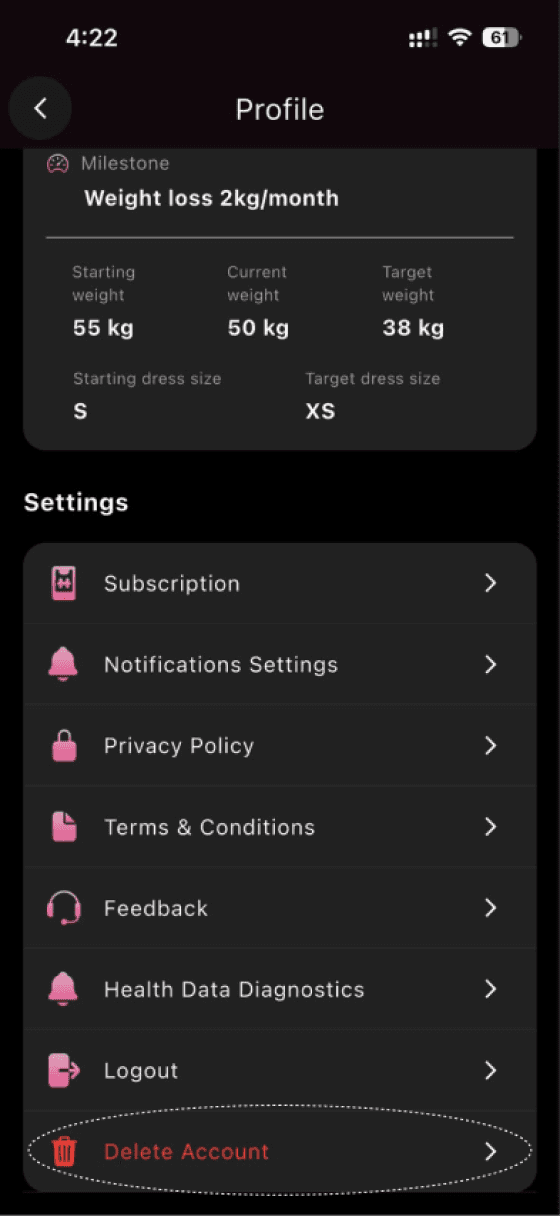
Tap Delete Account
Scroll down in Profile settings and
tap Delete Account.
3
4
Select a Reason
Select a Reason
Choose the reason for deleting your
account.

Confirm Deletion
Tap Delete to permanently remove
your account and data.

5
Once confirmed, your account and all associated data will be permanently
deleted and cannot be recovered.


Delete Your Sweatchi
Account
Follow these steps to permanently delete
your account and associated data.
1
Log in to Sweatchi
Open the Sweatchi app and sign in to
your account.
2
Open Profile
Navigate to the Profile section from the
bottom navigation bar.
3
Tap Delete Account
Scroll down in Profile settings and tap
Delete Account.
4
Select a Reason
Choose the reason for deleting your
account.
5
Confirm Deletion
Tap Delete to permanently remove your
account and data.
Once confirmed, your account and
all associated data will be
permanently deleted and cannot
be recovered.
Delete Your Sweatchi
Account
Follow these steps to permanently delete
your account and associated data.
1
Log in to Sweatchi
Open the Sweatchi app and sign in to
your account.
2
Open Profile
Navigate to the Profile section from the
bottom navigation bar.
3
Tap Delete Account
Scroll down in Profile settings and tap
Delete Account.
4
Select a Reason
Choose the reason for deleting your
account.
5
Confirm Deletion
Tap Delete to permanently remove your
account and data.
Once confirmed, your account and
all associated data will be
permanently deleted and cannot
be recovered.